Licence keys delivered by email, most within 24 hours
Genuine software licences · Secure checkout

Free tool
Is your Microsoft software still supported?
Check end-of-support dates for Windows, Office and Server before you upgrade.
Check nowMicrosoftDigital licence key
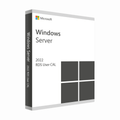
Microsoft Windows Server 2022 RDS Device CAL
$269.99
$674.98Save $404.99 (60%)
Instant email deliveryYour licence key is emailed to you instantly once your payment is confirmed. No shipping fee.
Faulty key? We replace itOr a full refund if we can'tSecure checkoutCard details never storedActivation guidesStep-by-step install helpEmail supportsupport@msckey.com
Secure payment
Check the edition, version, number of devices and that it supports your operating system before you buy. Not sure? Email us first.
Overview
Microsoft Windows Server 2022 Remote Desktop Services - 50 Device CAL
Buy Microsoft Windows Server 2022 RDS Device CALs from Msckey and save up to 88% from its original prices. At Msckey, you will get only the original and valid license key at an affordable price. Make your payment with our multiple secured payment methods and enjoy quick delivery right after completing your payment. We are determined to provide top-notch customer service and offer occasional discounts for our beloved customers. So, stay tuned to our website and get discounts and offers anytime.
What is Microsoft Windows Server 2022 RDS Device CAL?
Microsoft Windows Server 2022 RDS Device CAL, or Client Access Licenses, allows users to access and use applications, data, and desktops hosted on a remote server. This device CAL is a powerful license that ensures unconditional access to its advanced features and benefits of Windows Server 2022 Remote Desktop Service. With this Remote Desktop Services device CAL, you will get access to your Windows Server Infrastructure and ensure consistent and effective resource management. Therefore, grab the Windows Server 2022 Remote Desktop Services device CAL licenses at an unbeatable price from Msckey and optimize your IT environment with RDS device CAL's unlimited access to powerful features.
Elevate Your Remote Desktop Experience with Windows Server 2022 RDS
Remote Desktop Services Server 2022 has several key features and benefits that improve user experience with an easy management system. Here are the key features that you're looking for:
Device-Centric License
This Windows Server 2022 Remote Desktop Service CAL provides a device-centric license, which means it offers a license for a specific device, not an individual user. Therefore, this server resource is accessible to any number of users, so it is called a device-centric license. It could also be an ideal environment for multiple users sharing the same device, like educational institutions or public terminals.
Top-notch Security
The security of the Server 2022 RDS is top-notch and keeps up with digital advancements. It has robust security features like better isolation of virtual machines and optimized Windows Defender and Server 2022, characterized by a single sign-on feature to protect your remote desktop data and network against threats and attacks.
Enhanced Performance
RDS Server 2022 offers enhanced performance with its fast speed and accuracy. When users access remote resources, it provides minimal lag and high responsiveness. So, users find this Server 2022 Remote Desktop Service productive and collaborative.
Budget-Friendly Licensing
If you're looking for a cheap licensing model, then device CAls is the right choice for you! You would have to spend a lot of money if you purchased individual licenses for every user, whereas device CAL is cost-effective and connects multiple users to the same RDS environment. In this process, you can save a large amount of costs for your organization.
Flexible User Experience
The latest Windows Server 2022 RDS Device CAL offers a flexible user experience for small and large organizations. As your business emerges over time, Server 2022 RDS provides the facilities to add or remove devices to your needs. It has features like RemoteFX, which delivers better graphical performance on a remote connection.
Compliance with Microsoft Licensing
This RDS server version helps users cooperate with Microsoft licensing terms and conditions. It assists users in avoiding legal issues and ascertaining appropriate server resource usage guidelines.
Access to Remote Desktops and Applications
The Remote Desktop Service allows users to connect and interact with remote desktops and applications. It offers various applications and services hosted on the server, and users can work and collaborate in real-time using this remote desktop feature.
Integration with Other Services
With Microsoft Server 2022 RDS, you can control user access and permissions with the Active Directory Administrative Center. Moreover, Windows Server 2022 RDS supports deployment in virtual environments and shares Device CALs with multiple virtual machines.
Support for Multiple Users
This Windows Server 2022 RDS Device CAL offers shared device access for multiple users within a single device. For this, you don't need any additional User CALs and this shared device user number fluctuates depending on the suitable environments.
How to Install Remote Desktop Services Server 2022 With Device CAL License
As a verified seller of Microsoft, we always provide users with complete guidelines and deployment through email. We have various secure payment methods. While completing the payment for RDS License bundle offers like (5, 10, 20, 50), our delivery team will send the product instantly to the customer's email address. It contains an original product key with an official product download link, helping users download and activate their purchased products efficiently.
What Will You Get While Ordering in Msckey?
You must look for a trusted seller to get a valid license key at an affordable price. Msckey has all of the requirements that you need for an online seller. Check our ResellerRatings reviews, where customers talked about our software. Check here what's included in this purchase:
- Get your Microsoft Server 2022 RDS Device CAL license at the super fast delivery within 2 minutes.
- Receive a complete product download and activation instructions through our delivery email.
- Our product key is updatable, so update it whenever a new update is available.
- 30-days replacement warranty.
- Purchasing Invoice.
- Get effective live chat and free email support tickets while needed.
System Requirements for Server 2022 Remote Desktop Services
It's essential to keep the required server hardware on your device if you're setting up Windows Server 2022 RDS. Below this mentioned hardware requirement is necessary to handle the workloads effectively. Check out:
- Operating System: Windows Server 2022 Standard or Datacenter Edition can manage device CALs and host Remote Desktop Service efficiently.
- Processor: 64-bit processor with 1.4 GHz speed
- RAM: A minimum of 2 GB RAM but 8 GB or more for heavy workloads
- Storage: 32 GB disk space is the least requirement, but 100 or more is recommended.
- Network Adapter: 1 Gbps Ethernet is basic, but 10 Gbps or higher is recommended for controlling large data files.
- Graphics: A graphics adapter that supports server display needs but, for high performance, needs dedicated graphics.
- Active Directory: An Active Directory domain is used to control group policies, user accounts, and Device CAL assignments.
- DNS Configuration: Make sure the DNS is configured properly and well-functioning.
How it works
Pay securelyCheck out with your card or PayPal. Your card details are never stored by Msckey.
Get your key by emailYour licence key is sent to your checkout email, usually within 1 to 24 hours of payment confirmation.
Install and activateDownload the software and enter your key. Our guides walk you through every step. Activation guides →
Frequently asked questions
How will I receive my licence key?
We email your licence key to the address you enter at checkout. Nothing is shipped physically, and there is no shipping fee.
How long does delivery take?
Most orders arrive within 1 to 24 hours of payment confirmation. Delivery can take longer if a payment needs a security review. If your key hasn't arrived 24 hours after payment confirmation, email support@msckey.com with your order number.
What if my key doesn't work?
We replace faulty keys. If we can't supply a working replacement, you get a full refund. Email support@msckey.com with your order number, a screenshot of the activation error and your system details.
Can I cancel my order?
Yes, for a full refund, as long as your key hasn't been delivered yet. Once a key is delivered it can't be returned for a change-of-mind refund. See our Shipping & Returns policy.
Which payment methods can I use?
We accept major credit and debit cards and PayPal. All prices are in USD. See our Payment page for details.
You may also like

My Wishlist
Wishlist is empty.
Compare
Shopping cart