Licence keys delivered by email, most within 24 hours
Genuine software licences · Secure checkout

Free tool
Is your Microsoft software still supported?
Check end-of-support dates for Windows, Office and Server before you upgrade.
Check nowMicrosoftDigital licence key
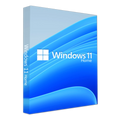
Microsoft Windows 11 Home
$28.99
$72.48Save $43.49 (60%)
Instant email deliveryYour licence key is emailed to you instantly once your payment is confirmed. No shipping fee.
Faulty key? We replace itOr a full refund if we can'tSecure checkoutCard details never storedActivation guidesStep-by-step install helpEmail supportsupport@msckey.com
Secure payment
Check the edition, version, number of devices and that it supports your operating system before you buy. Not sure? Email us first.
Overview
Achetez une clé de licence Microsoft Windows 11 Home au meilleur prix
Windows 11 Home est la version classique de Windows 11, qui intègre des capacités professionnelles destinées aux clients professionnels. Tout ce dont vous avez besoin est réuni dans un seul système puissant.
Profitez du nouveau menu Démarrer de Windows 11 Home, ainsi que de diverses nouvelles façons de démarrer votre ordinateur. Avec Microsoft Edge, vous pouvez rester en contact avec vos proches, suivre l’actualité, jouer et obtenir des informations vérifiées. Windows 11 Home est l’espace où vous pouvez réfléchir, vous exprimer et créer de manière professionnelle.
Le menu Démarrer de l’édition Windows 11 Home a été entièrement repensé. Au centre se trouve une liste de destinations et d’autres options, et à droite, des applications représentées par des vignettes. Le menu peut en outre être agrandi, voire étendu pour occuper tout l’écran.
La nouvelle interface utilisateur de Windows 11 vous offre une nouvelle perspective. Windows 11 Home crée un environnement apaisant et créatif dans lequel vous pouvez explorer vos passions d’une nouvelle manière.
Avec Windows 11 Home, vous gagnez en productivité en accédant à tous les programmes dont vous avez besoin, y compris les applications Android. Utilisez des fonctionnalités comme les dispositions d’ancrage (Snap layouts), les bureaux virtuels (à distance) et une nouvelle expérience plus intuitive pour gérer plusieurs tâches en toute simplicité.
Dans Windows 11 Home, utilisez Microsoft Teams pour échanger d’une nouvelle manière. Microsoft Teams, qui remplace Skype, longtemps plébiscité, vous permet de communiquer instantanément avec les personnes qui comptent pour vous, directement depuis votre bureau. Quel que soit l’appareil qu’elles utilisent, elles peuvent vous appeler ou discuter avec vous gratuitement.
Grâce à Microsoft Edge et à une variété de widgets disponibles dans Windows 11 Home, vous pouvez personnaliser vos propres contenus. Vous restez facilement informé de l’actualité, des informations et des divertissements qui vous intéressent.
Le nouveau Microsoft Store vous permet de trouver facilement les programmes dont vous avez besoin et les séries que vous souhaitez regarder. Vous pouvez également utiliser la technologie Intel Bridge pour exécuter des applications Android sur Windows 11 Home ou les télécharger depuis le Microsoft Store.
Avec des capacités graphiques plus vraies que nature, Windows 11 Home fait passer le jeu vidéo à un tout autre niveau. Avec le Xbox Game Pass, vous pouvez jouer à plus de 100 jeux de grande qualité et découvrir votre prochain coup de cœur (abonnement vendu séparément).
Comment la clé Windows 11 Home est-elle livrée/téléchargée ?
Notre système de livraison électronique rapide et efficace permet l’attribution automatique de votre clé de produit et une livraison quasi instantanée. Une fois le paiement traité, votre clé de produit unique s’affiche à l’écran avec un lien officiel Microsoft pour télécharger votre logiciel. Nous envoyons également cette confirmation à l’adresse e-mail indiquée lors de la commande. Nous pouvons ainsi offrir un service rapide à tous nos clients, à toute heure du jour.
Fonctionnalités de Windows 11 Home
Windows 11 Home offre les principales fonctionnalités suivantes
Microsoft Store : le Microsoft Store est une boutique en ligne qui vend des produits Microsoft. Vous pouvez y télécharger des applications Windows pour votre tablette ou votre PC Windows. Des milliers d’applications gratuites et payantes sont classées par catégorie, avec des avis et des notes d’utilisateurs pour vous aider à comparer.
Microsoft Teams : Teams est désormais accessible directement depuis la barre des tâches de Windows 11, ce qui le rend encore plus simple à utiliser. Teams est disponible sur Windows, Mac, Android et iOS.
Une meilleure expérience de jeu avec le Xbox Game Pass : certaines fonctionnalités des consoles Xbox, comme Auto HDR et DirectStorage, sont désormais disponibles dans Windows 11 Home pour améliorer le jeu sur votre PC Windows.
Prise en charge des bureaux à distance (virtuels) (client uniquement) : les bureaux virtuels de Windows 11 vous permettent de basculer entre plusieurs environnements pour un usage personnel, professionnel, scolaire ou ludique. La Connexion Bureau à distance de Microsoft vous permet de vous connecter à un autre ordinateur depuis n’importe où dans le monde. Dans Windows 11, elle est désactivée par défaut.
Windows Hello : utilisez Windows Hello pour vous connecter à votre compte Microsoft. Avec Windows 11 Home, vous pouvez désormais vous connecter à votre appareil depuis l’écran de verrouillage et utiliser Windows Hello pour vous identifier sur votre compte en ligne.
Chiffrement de l’appareil : le chiffrement de l’appareil est inclus dans Windows 11 Home. Il s’agit d’une fonctionnalité de sécurité de Microsoft Windows qui chiffre le disque système afin de protéger vos données. Lorsque le chiffrement est activé, seules les personnes autorisées peuvent accéder à votre appareil et à vos données.
Sécurité réseau et pare-feu : restez protégé en toute sérénité. La fonctionnalité Pare-feu & protection du réseau de Sécurité Windows, incluse dans Windows 11 Home, vous permet de vérifier l’état du Pare-feu Microsoft Defender et de voir à quels réseaux votre appareil est connecté.
Sécurité Internet : la sécurité est un élément essentiel de Windows 11 Home, mais il s’agit aussi d’offrir productivité et confort d’utilisation avec toutes les fonctions de sécurité activées. C’est pourquoi le système intègre une protection Internet qui vous protège contre les attaques provenant d’Internet.
Contrôle parental et protection : vous donner la maîtrise de votre confidentialité est la première étape. Vous devez disposer des ressources et des connaissances nécessaires pour prendre des décisions éclairées. Vous pouvez accéder à vos données stockées dans le cloud et les gérer.
Démarrage sécurisé : le Démarrage sécurisé (Secure Boot) est une norme de sécurité établie par des acteurs de l’industrie du PC pour garantir qu’un appareil démarre uniquement avec des logiciels approuvés par le fabricant (OEM). Avant le démarrage de l’ordinateur, le micrologiciel vérifie la signature de chaque élément logiciel de démarrage, y compris les pilotes de micrologiciel UEFI (également appelés Option ROM), les programmes EFI et le système d’exploitation. Si les signatures sont valides, le PC démarre et le micrologiciel transmet le contrôle au système d’exploitation.
Antivirus Windows Defender : protégez vos données et vos appareils avec l’application Sécurité Windows et le logiciel Antivirus Microsoft Defender de Windows 11 Home.
Dispositions d’ancrage et groupes d’ancrage (Snap Layouts et Snap Groups) : il s’agit de groupes de programmes que vous utilisez simultanément, placés dans la barre des tâches, que vous pouvez afficher ou réduire en même temps pour passer plus facilement d’une tâche à l’autre. Windows 11 Home n’est-il pas un système d’exploitation formidable ?
Ils facilitent également le branchement et le débranchement d’un écran sans perdre la position de vos fenêtres ouvertes.
Autres fonctionnalités notables de Windows 11 Home
- Configuration avec un compte local
- Jonction à Active Directory/Azure AD
- Hyper-V
- Windows Sandbox
- Chiffrement de l’appareil BitLocker
- Protection des informations Windows
- Gestion des appareils mobiles (MDM)
- Stratégie de groupe
- Enterprise State Roaming avec Azure
- Accès attribué
- Approvisionnement dynamique
- Windows Update for Business
- Mode kiosque
Configuration requise
- Processeur : 1 gigahertz (GHz) ou plus avec au moins 2 cœurs sur un processeur 64 bits compatible ou un système sur puce (SoC)
- RAM : 4 Go
- Stockage : 64 Go ou plus
- Micrologiciel système : UEFI, compatible Démarrage sécurisé
- TPM : Module de plateforme sécurisée (TPM) version 2.0
- Carte graphique : compatible DirectX 12 ou version ultérieure avec pilote WDDM 2.0
- Écran : écran haute définition (720p) de plus de 9 pouces de diagonale, 8 bits par canal de couleur
- Internet : l’édition Windows 11 Home nécessite une connexion Internet et un compte Microsoft (s’ouvre dans un nouvel onglet) pour terminer la configuration de l’appareil lors de la première utilisation.
How it works
Pay securelyCheck out with your card or PayPal. Your card details are never stored by Msckey.
Get your key by emailYour licence key is sent to your checkout email, usually within 1 to 24 hours of payment confirmation.
Install and activateDownload the software and enter your key. Our guides walk you through every step. Activation guides →
Frequently asked questions
How will I receive my licence key?
We email your licence key to the address you enter at checkout. Nothing is shipped physically, and there is no shipping fee.
How long does delivery take?
Most orders arrive within 1 to 24 hours of payment confirmation. Delivery can take longer if a payment needs a security review. If your key hasn't arrived 24 hours after payment confirmation, email support@msckey.com with your order number.
What if my key doesn't work?
We replace faulty keys. If we can't supply a working replacement, you get a full refund. Email support@msckey.com with your order number, a screenshot of the activation error and your system details.
Can I cancel my order?
Yes, for a full refund, as long as your key hasn't been delivered yet. Once a key is delivered it can't be returned for a change-of-mind refund. See our Shipping & Returns policy.
Which payment methods can I use?
We accept major credit and debit cards and PayPal. All prices are in USD. See our Payment page for details.
You may also like

Ma liste de souhaits
Votre liste de souhaits est vide.
Comparer
Panier